Kai & MSys MCPThe Smart Extensionin Delphi RAD Studio
The Powerful Extension
MCP for RAD Studio
Extended access to RAD Studio for Kai and other AI clients.
MCP for RAD provides MCP-enabled clients with structured access to the running IDE. This allows projects, source code, forms, build configurations, debuggers, and Project ToDos to be evaluated and edited within the existing development context. A special focus is on Kai; the open MCP interface can also be used by other compatible clients.
For RAD Studio 12.x and upward compatible
Local MCP Server in the IDE
Part of the MSys Tool Suite
Delphi Components and Tools
Project ToDo ManagerSBOM GeneratorCode SignerMCP for RAD
Modern development tools for professional Delphi projects.
Fewer switches between IDE, project, and AI assistant.
MCP for RAD makes the current project and IDE context controllably available to compatible AI clients. This allows teams to process tasks such as code analysis, changes, builds, debugging, and project documentation in a cohesive workflow, instead of manually transferring information between multiple applications.
Find the Kai for RAD Studio product from Embarcadero via an external link here.
Fewer switches between IDE, project, and AI assistant.
MCP for RAD makes the current project and IDE context controllably available to compatible AI clients. This allows teams to process tasks such as code analysis, changes, builds, debugging, and project documentation in a cohesive workflow, instead of manually transferring information between multiple applications.
Specifically tailored for Kai, open for other clients. Kai gains extended access to RAD Studio; at the same time, the connection remains usable for other MCP-enabled clients thanks to the Model Context Protocol.
Current Git Status
One tool. 122 tools for RAD Studio.
Each tool is a clearly defined action that a connected AI client can execute or query in RAD Studio – for example, compiling a project, changing a code area, setting a breakpoint, or inspecting a component in the Form Designer. Together, they form ten functional areas.
Compile, clean, read or set configurations and options, and add, remove, and rename project files.
Project ToDos
0
Search, create, add notes to, prioritize, link, and complete project tasks.
IDE ToDos & App Automation
0
Edit IDE ToDos and examine the launched application via UI tree, inputs, and actions.
Editor and Source Code
0
Open and save files, read areas, query selection and cursor, and perform content-anchored changes.
Form Designer
0
Inspect components, properties, and events, edit DFM content, and capture the designer state as a screenshot.
File System
0
Read, write, move, and delete files, and search for text or replace content project-wide.
Database and Code Intelligence
0
Connect databases, query SQL and schema, and utilize Delphi diagnostics and Code Insight information.
Further IDE Functions
0
Query notifications and installed packages – supplementary tools for the complete IDE context.
A Cohesive Workflow
Strength comes from combination.
The 122 tools are not an end in themselves. A connected AI assistant can combine several of them in a workflow and use the feedback from RAD Studio directly for the next step.
Visibly manage tools, sessions, and connections.
Directly in the IDE
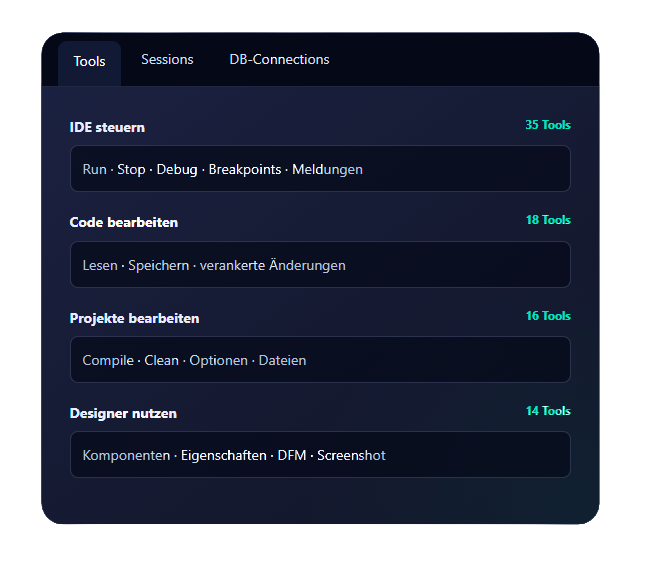
The MCP dock window shows the provided tools, active client sessions, and database connections. A real screenshot should demonstrate the technical depth here and also show that MCP for RAD is not an external additional service, but part of the running Delphi IDE.
Read Project and CodeCapture active configuration, units, forms, and open Project ToDos.
1
Edit SpecificallyModify source code anchored to the read content and adjust project options.
2
Build and DebugCompile project, evaluate messages, set breakpoints, and check runtime values.
3
Document ResultsControl diagnostics and update the associated Project ToDo task.
4
Technical Framework
Local MCP Server in RAD Studio
The server runs as part of the MSys Tool Suite and is configured via Tools > Options > MSys > MCP Server.
IDE
RAD Studio 12.x und aufwärtskompatibel · Delphi und C++Builder · Win32-IDE
Transport
Streamable HTTP via a locally configured endpoint, for example localhost:8080/mcp
Configuration
Port, endpoint, and automatic start; a .mcp.json can be generated for the selected workspace
Resources
Logs, debugger status, integrated skills, and – if the plugin is installed – Project ToDos
Project ToDos
Optional extension with 13 project-related tools; MCP for RAD also works without this plugin
Protocol
Supported MCP Revision: 2026-07-28
For Local Use
The server currently has no dedicated authentication and technically listens on all interfaces. The configured port must therefore not be publicly accessible and should be restricted to the local machine via a firewall.
Plug-in Suite for Delphi
MSys Tool Suite for Delphi RAD
The MSys Tool Suite bundles a growing selection of extensions for typical tasks in Delphi and C++Builder projects.
The required plugins are installed together, appear in the MSys menu, and work directly within the context of RAD Studio. This avoids creating another platform alongside the IDE. The functions complement the existing development workflow where they are needed.
Organization
Project ToDo Manager
Manages tasks directly within the project and keeps open items linked to the associated Delphi code.