Project ToDo ManagerSBOM GeneratorMCP for RADCode Signer
Modern development tools for professional Delphi projects.
Code Signer
Code signing directly in the Delphi build.
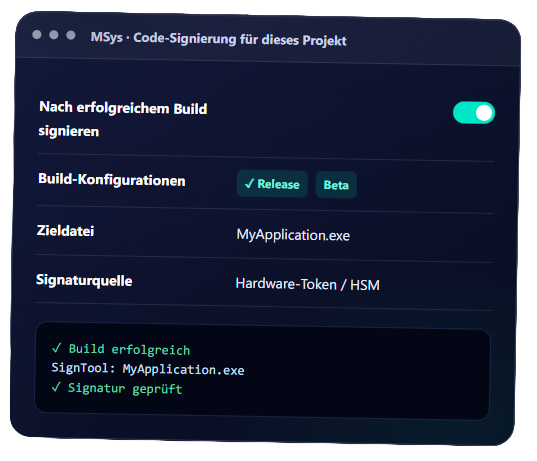
The MSys Code Signer extends RAD Studio with an automated signing step. After a successful build, the plugin signs the generated EXE, DLL, or BPL using SignTool—depending on the project settings and the active build configuration.
For RAD Studio 12.x and upward compatible
Integrated directly into the Delphi IDE
Part of the MSys Tool Suite
Delphi Components and Tools
Project ToDo ManagerSBOM GeneratorCode SignerMCP for RAD
Modern development tools for professional Delphi projects.
Component of MSys Tool Suite
The MSys Code Signer
EXE, DLL & BPL
Signs the actual target file
Release-driven
Define configurations per project
3 signature sources
Token, file, and Azure ready
Traceable
Output in the MSys message window
For development and IT management
Automatic signing after successful builds.
Without build integration, code signing often remains a manual step. The MSys Code Signer executes it within RAD Studio, using separate settings for the project and the respective development machine.
Rules per projectActivation, build configurations, description, and product URL are stored in the project and can be versioned along with the source code.
1
Local signature sourceCertificate, SignTool path, timestamp service, and token are configured separately on the development machine and do not belong in the repository.
2
Visible processRAD Studio shows progress, tool output, and errors directly during signing. The steps performed are also logged in the MSys output window.
3
Automated workflow
Four steps to the signed target file.
After a successful build, the plugin checks whether the project is enabled for signing and if the current build configuration should be signed. Only then is SignTool started for the generated file.
BuildRAD Studio generates the target file.
1
Check rulesProject enablement and configuration are verified.
2
SignSignTool processes the EXE, DLL, or BPL.
3
DocumentStatus and output are sent to the MSys output window.
4
Clear separation
Product defaults and machine configuration in the right place
The decision to sign belongs to the project. Tokens, certificate files, and tool paths belong to the respective development machine. The MSys Code Signer deliberately separates these two levels.
In the project: Activation, build configurations, description, and product URL.
On the machine: Signature source, SignTool, timestamp, hash method, and time limit.
What matters in daily work
One tool for different signing methods
Exactly one signature source is used per configuration. This ensures that the required SignTool parameters remain unambiguous.
Hardware Token / HSMSelection of the certificate from the Windows Certificate Store. Optionally, the token PIN can be stored for builds without prompts.
Certificate fileSigning with a certificate file, for example in PFX format, and a dedicated file password.
Azure Trusted SigningThe SignTool connection via library and metadata is technically prepared.
Hardware Token / HSMSelection of the certificate from the Windows Certificate Store. Optionally, the token PIN can be stored for builds without prompts.
Certificate fileSigning with a certificate file, for example in PFX format, and a dedicated file password.
Azure Trusted SigningThe SignTool connection via library and metadata is technically prepared.
Automation via CLI
Execute code signing outside the IDE as well.
In addition to the integration in RAD Studio, the signing process is also available for the command line. This allows signing to be integrated into existing build scripts and CI/CD pipelines.
Build scripts
Signing steps can be called reproducibly after the generation of EXE, DLL, and BPL files.
CI/CD pipelines
Release artifacts can also be integrated into the intended delivery process on automated build systems.
Uniform rules
The IDE and command line follow the same project-related specifications for target files and build configurations.
Benefits for the company
Uniform release rules for Delphi teams
Project-related specifications move with the code. Developers use their respective approved local signature source, while the signing process remains consistent within the project.
Only if the project has been enabled for it and the active build configuration is in the approved list. By default, signing is designed for release builds.
No. The connection is prepared but has not yet been practically tested due to the lack of an available account.
Plug-in Suite for Delphi
MSys Tool Suite for Delphi RAD
Other integrated tools in the suite.
The MSys Tool Suite bundles plugins for Delphi and C++Builder from RAD Studio 12.x onwards: SBOM creation, project-related tasks, automatic reloading, and the connection of AI clients via MCP.
Transparency
SBOM Generator
Documents the components of a Delphi project as a standardized Software Bill of Materials.
Whether it's a support request, a suggestion for improvement, or a new feature wish – you can easily submit your concern via our ticket system and track the processing status at any time.